Analytics Overview

View as Markdown

Analytics Overview

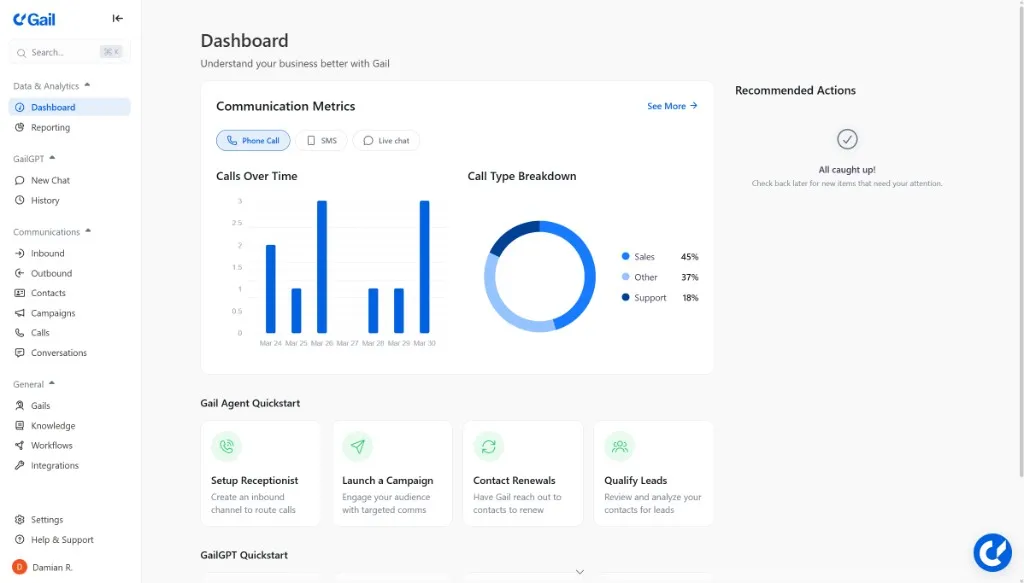
Gail provides detailed analytics to help you understand how your agents are performing and where you can improve.

Dashboard

The Analytics dashboard gives you an at-a-glance view of key metrics:

Total Calls
Today’s call volume
Avg Duration
Average call length
Resolution Rate
Calls resolved without escalation
Satisfaction
Customer satisfaction score

Key Metrics

Call Volume

Track call patterns over time:

  • Hourly breakdown - Identify peak hours
  • Daily trends - Spot patterns across the week
  • Monthly comparison - Track growth over time

Call Outcomes

Understand how calls are resolved:

OutcomeDescription
ResolvedAgent successfully handled the request
TransferredCall escalated to human agent
VoicemailCaller left a message
AbandonedCaller hung up before resolution

Performance Metrics

  • Average Handle Time (AHT) - How long calls typically last
  • First Call Resolution (FCR) - Issues resolved in one call
  • Transfer Rate - Calls escalated to humans
  • Containment Rate - Calls fully handled by AI

Filtering & Segmentation

Slice data by:

  • Date range - Custom periods or presets
  • Agent - Individual agent performance
  • Phone number - Traffic by number
  • Outcome - Filter by resolution type
  • Intent - Group by caller intent

Visualizations

Time Series Charts

Track metrics over time with interactive charts:

  • Zoom into specific periods
  • Compare different metrics
  • Export data for analysis

Distribution Charts

Understand the spread of key metrics:

  • Call duration distribution
  • Time to resolution
  • Customer sentiment scores

Heat Maps

Visualize patterns:

  • Call volume by hour and day
  • Peak times
  • Geographic distribution

Real-Time Monitoring

Watch metrics update in real-time:

  • Active calls right now
  • Today’s running totals
  • Live sentiment tracking
  • Queue status

Scheduled Reports

Receive regular reports via email:

  1. Go to AnalyticsScheduled Reports
  2. Click Create Report
  3. Select metrics and format
  4. Set schedule (daily, weekly, monthly)
  5. Add recipients

Report Formats

  • PDF - Formatted for sharing
  • CSV - Raw data for analysis
  • Excel - Pivot tables and charts

Data Export

Export analytics data for external analysis:

$curl -X GET "https://api.meetgail.com/v1/analytics/export" \
> -H "Authorization: Bearer $API_KEY" \
> -d "start_date=2024-01-01" \
> -d "end_date=2024-01-31" \
> -d "format=csv"

Data Retention

PlanRetention
Starter30 days
Professional1 year
EnterpriseUnlimited

Next Steps

  • Call Logs - Review individual call details and performance