
Setting Up Actions
Overview
Actions (otherwise known as Scenarios) are customizable conversation flows that guide your AI through specific processes and actions when someone calls. They define what Gail should say, what information to collect, and how to handle different situations.
The terms “Actions” and “Scenario” are interchangeable throughout Gail’s platform.
Accessing Actions
To set up Actions:
- Log into your Gail portal
- In the left-hand menu, open Communications and click Inbound
- Open the Actions tab
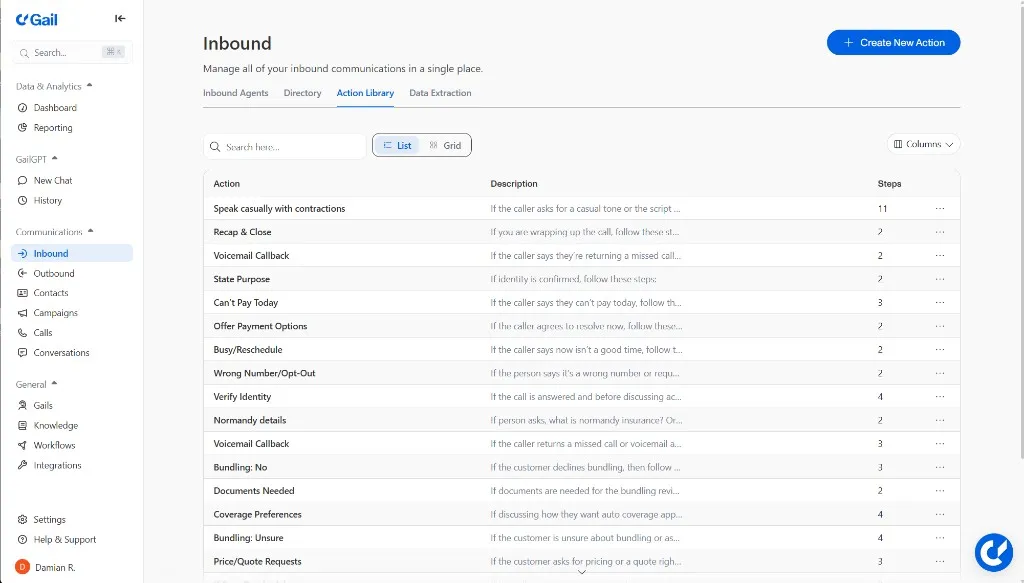
You can also attach and enable these actions on a specific script from Scripts > open a script > Script & Actions.
Action Structure
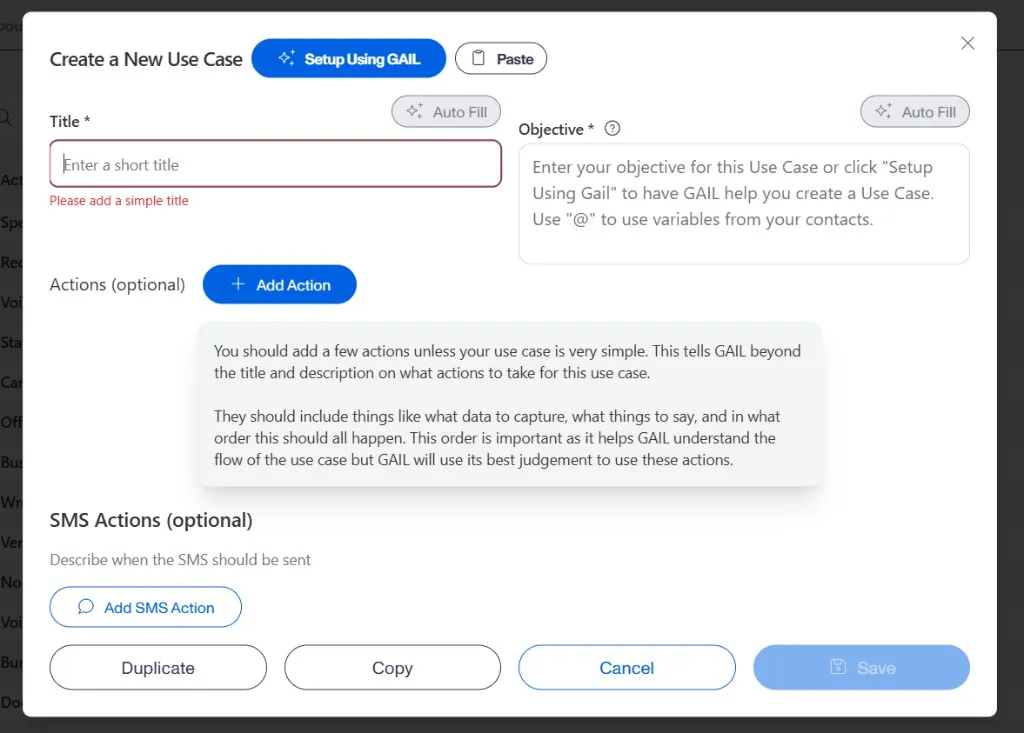
Each Action should include:
- Title - An easily identifiable title to understand the purpose of the Action
- Clear objective - The trigger for when this action should be completed
- Steps - The different steps that Gail will need to complete to accurately accomplish the goal of the action. Steps can include:
- Sample phrases - Suggested language for Gail to use
- Specific questions - What information to collect
- Next steps - Routing or follow-up instructions
Action Categories
1. Information Collection
Collect Basic Customer Information
Gather basic information and determine if caller is a current client or prospect.
Setup:
- Action Title: “Collect Basic Customer Information”
- Objective: “When the caller asks for a call back, follow these steps:”
- Step 1: “Ask the caller for their full name”
- Step 2: “Ask the caller for their policy number”
- Step 3: “Ask the caller for the best contact number to reach them”
New Prospect Qualification
Setup:
- Action Title: “New Prospect Qualification”
- Objective: “If the caller says they are a new client and they want to get coverage or get a quote, follow these steps:”
- Required Steps:
- Step 1: “Where did you hear about or get referred to this insurance agency?”
- Step 2: “What is the name of the applicant or proposed insured?”
- Step 3: “What is your date of birth?”
- Step 4: “What is your marital status?“
2. Insurance-Specific Actions
Homeowner Insurance Information Collection
Setup:
- Action Title: “Homeowner Insurance Qualification”
- Objective: “If the caller says they would like to get a quote or take out a policy for homeowners insurance, follow these steps”
- Required Steps:
- Step 1: “Ask the caller for the property location”
- Step 2: “Ask the caller for if they own or rent status and duration”
- Step 3: “Ask the caller for the mortgage amount and company”
- Step 4: “Ask the caller what the construction type of the home is”
- Step 5: “Ask the caller for the square footage and build year”
- Step 6: “Ask the caller for the Purchase date and rebuild cost estimate”
- Step 7: “Ask the caller if the home has Security systems”
- Step 8: “Ask the caller if the home has Exterior features (fireplaces, wood stoves)”
- Step 9: “Ask the caller if the home has any Additional features (pool, trampoline, pets)“
Commercial Auto - Driver Information
Setup:
- Action Title: “Commercial Auto - Driver Info”
- Objective: “If the caller says they want to get a quote for commercial auto insurance, follow these steps:”
- Required Steps:
- Step 1: “Ask the caller for the Driver details (names, DOB, SSN, license numbers)”
- Step 2: “Ask the caller how many Years of commercial driving experience they have”
- Step 3: “Ask the caller for their Accident/violation history (past 5 years)”
- Step 4: “Ask the caller what kind of Workers’ compensation coverage they need”
- Step 5: “Ask the caller for the Vehicle usage details”
- Step 6: “Ask the caller what their MVR ordering process is like”
- Step 7: “Ask the caller for their Driver reporting procedures”
- Step 8: “Ask the caller for their Pay basis information”
- Step 9: “Ask the caller for their Arrest/conviction history”
Commercial Auto - Vehicle Information
Setup:
- Action Title: “Commercial Auto - Vehicle Info”
- Objective: “If the caller wants to add a vehicle to their commerical auto policy, follow these steps:”
- Required Steps:
- Step 1: “Ask the caller for the Vehicle details (make, model, year, VINs)”
- Step 2: “Ask the caller fir tge Lessor additional insured status”
- Step 3: “Ask the caller what kind of Physical damage coverage details they need”
- Step 4: “Ask the caller for the Loss payee information”
3. Claims Processing
Claim Intake and First Notice of Loss
Setup:
- Action Title: “Claim Filing Process”
- Objective: “If the caller wants to file a claim, follow these steps:”
- Required Steps:
- Step 1: “Ask the caller if anyone is hurt or if this is an emergency”
- Step 2: “If the caller says this is an emergency or that people are hurt, tell the caller to hang up and immediately call 911”
- Step 3: “If the caller says this is not an emergency, or that no one is injured, proceed to the next steps:”
- Step 4: “Ask the caller what type of claim they would like to file”
- Step 5: “If the caller says they would like to file an auto claim, proceed to the Auto Claim Intake Action”
- Step 6: “If the caller says they would like to file a homeowners claim, proceed to the Homeowners Claim Intake Action”
Explain Claim Process
Setup:
- Action Title: “Explain Claim Process”
- Objective: “If the caller has questions about how the claim process works, follow these steps:”
- Required Steps:
- Step 1: “Tell the caller that we do not handle claims in house”
- Step 2: “Tell the caller that they will be able to give us the claim information and that we will then pass that information on to their carrier”
- Step 3: “Tell the caller that once their information is passed onto their carrier, all communications will be handled by the carrier”
- Step 4: “Tell the caller that once the carrier receives the claim information, there will be a Claims Adjustor that is assigned to their claim”
- Step 5: “Tell the caller that once the claims adjustor is assigned to their claim, they will be in contact with the caller to be able to go over the details”
4. Specialized Handling
Certificate of Insurance (COI) Requests
Setup:
- Action Title: “COI Processing”
- Objective: “If the caller wants to receive their COI documents, follow these steps:”
- Required Steps:
- Step 1: Confirm insured’s identity (full name, email, policy number)
- Step 2: Determine if existing COI needs changes or new certificate required
- Step 3: If the caller says they need changes or a new certificate, follow these steps:
- Step 4: Ask the caller for the Exact name and address of Certificate holder
- Step 5: Ask the caller if the need any Additional insured requirements
- Step 6: Ask the caller if they need any Specific wording for description of operations
Policy Cancellation Process
Setup:
- Action Title: “Policy Cancellation Process”
- Objective: “If the caller wants to cancel their policy, follow these steps:”
- Required Steps:
- Step 1: Ask the caller for the cancellation reason
- Step 2: Address price/service concerns if applicable
- Step 3: Express regret and how we value their business
- Step 4: Request new declarations page if price-motivated
- Step 5: Offer to re-quote through carriers
- Step 6: Ask the caller if they can give any feedback for improvement
5. Routing and Transfers
Request Live Agent
Setup:
- Action Title: “Request Live Agent”
- Objective: “If the caller wants to speak to a live agent, a representative, or a human, follow these steps:”
- Required Steps:
Best Practices
1. Be Specific with Instructions
- Provide exact phrases and questions
- Include conditional logic (if/then scenarios)
- Specify required vs. optional information
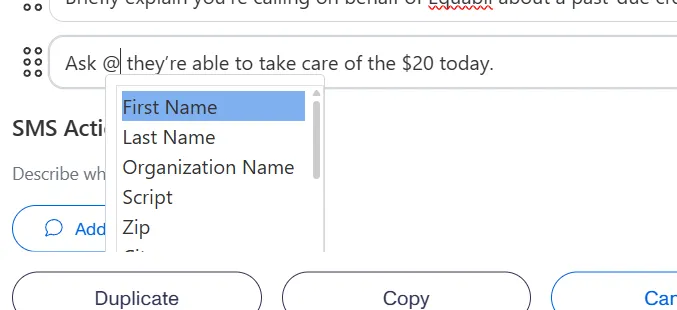
2. Use Dynamic Fields
- Incorporate variables like
\{\{Contact First Name\}\}and\{\{Agency Name\}\} - Ensure personalization in outbound campaigns
3. Plan for Multiple Scenarios
- Create branching logic for different responses
- Include fallback options for unexpected answers
4. Test Your Actions
- Run test scenarios before going live
- Verify all routing and transfer instructions work correctly
5. Regular Updates
- Review and update Actions based on performance
- Incorporate feedback from actual customer interactions
Quick Setup with AI
Instead of manually configuring each Action, you can use the “Setup using Gail” tool where you provide basic or detailed instructions and have Gail build the Action for you automatically.
Implementation Steps
- Identify Your Needs - Determine which Actions your agency requires based on your most common call types
- Create Actions - Set up each Action following the examples above
- Test Functionality - Run test calls to ensure Actions work as intended
- Train Your Team - Ensure staff understand how Actions route calls and collect information
- Monitor and Refine - Regularly review Action performance and make adjustments as needed
Next Steps
- Learn more about creating your first Gail in First Gail
- Set up your Directory for call transfers