
Reviewing SMS Conversations
Once your SMS campaigns are running, it’s important to monitor the conversations between Gail and your contacts. Reviewing SMS conversations helps you ensure message quality, track customer engagement, refine your scripts, and identify opportunities for improvement.
Why Review SMS Conversations?
Regularly reviewing SMS conversations provides valuable insights:
- Monitor Response Quality: See how Gail is handling prompts and replies from contacts
- Track Engagement: Identify which messages and approaches generate the most responses
- Ensure Compliance: Verify that the correct scripts and workflows are being followed
- Improve Performance: Spot areas where messaging can be refined for better results
- Customer Insights: Understand common questions, concerns, and objections
- Training Data: Use successful conversations as examples for optimizing future campaigns
Accessing SMS Conversations
1. Navigate to Conversations
From the left-hand menu in your Gail portal, click on the Conversations tab.
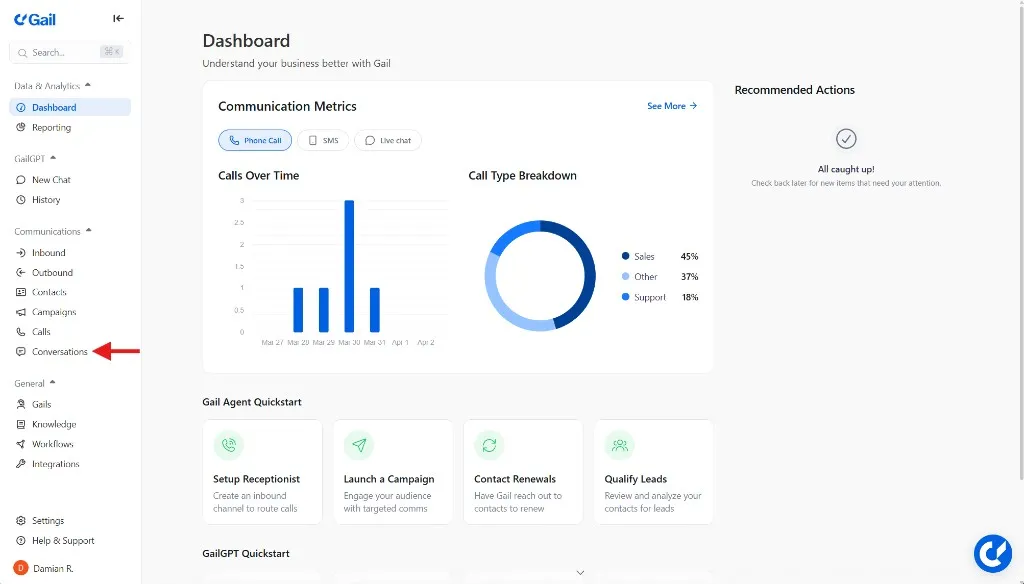
This is your central hub for viewing all communication history between Gail and your contacts.
2. View Active Conversations
In the Conversations tab, you’ll see a comprehensive list of all SMS conversations that have taken place with Gail.
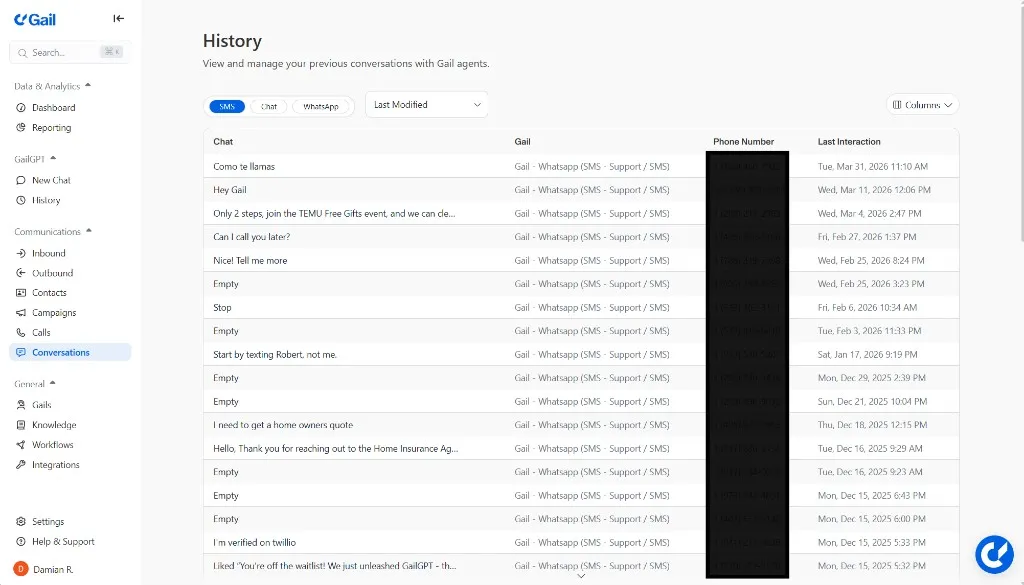
Each conversation entry displays:
- Phone Number: The phone number that was texted
- Last Interaction: The latest message timestamp and preview
- Gail: The Gail that was used for this conversation
- Chat: The last message sent by the client in the conversation
Reviewing Message History
1. Open a Conversation
To review a specific conversation, simply click on it from the list.
This will open the full conversation view, displaying the complete message thread between Gail and the contact.
2. Review the Full Thread
Once inside the conversation view, you can see the entire message history.
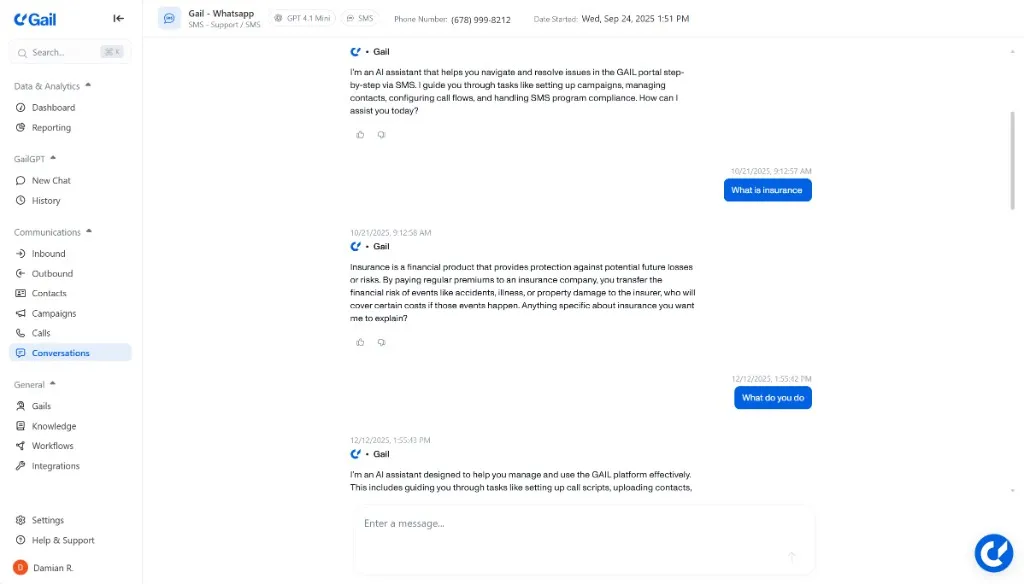
The conversation thread includes:
- All SMS Messages: Every message exchanged between Gail and the contact
- Timestamps: Exact date and time of each message
- Message Direction: Clear indication of incoming vs. outgoing messages
3. Analyze Conversation Flow
As you review conversations, pay attention to:
- Response Rate: Did the contact engage with Gail’s messages?
- Response Quality: Are responses relevant and meaningful?
- Conversation Length: How many exchanges occurred before completion?
- Drop-off Points: Where do contacts stop responding?
- Goal Achievement: Did the conversation achieve its intended outcome?
What to Look For
Positive Indicators
Signs that your SMS campaigns are performing well:
- Contacts respond promptly and positively
- Gail accurately understands and addresses contact inquiries
- Conversations naturally progress toward the desired outcome
- Clear appointments booked or actions taken
- Minimal confusion or clarification requests
Warning Signs
Issues that may require attention:
- High number of confused or frustrated responses
- Contacts frequently asking for human assistance
- Script responses that don’t match contact questions
- High opt-out rates after initial message
- Messages going unanswered
- Technical errors or failed message delivery
- Compliance concerns or inappropriate language
Taking Action
Making Improvements
Based on your conversation reviews, you can:
- Refine Templates: Update your text templates to address common questions or objections
- Adjust Scripts: Modify Gail’s response logic for better conversation flow
- Update Variables: Ensure contact data is properly populating in messages
- Timing Adjustments: Change when messages are sent based on engagement patterns
- Segment Contacts: Create more targeted campaigns based on response behavior
Responding Manually
If a conversation requires human intervention:
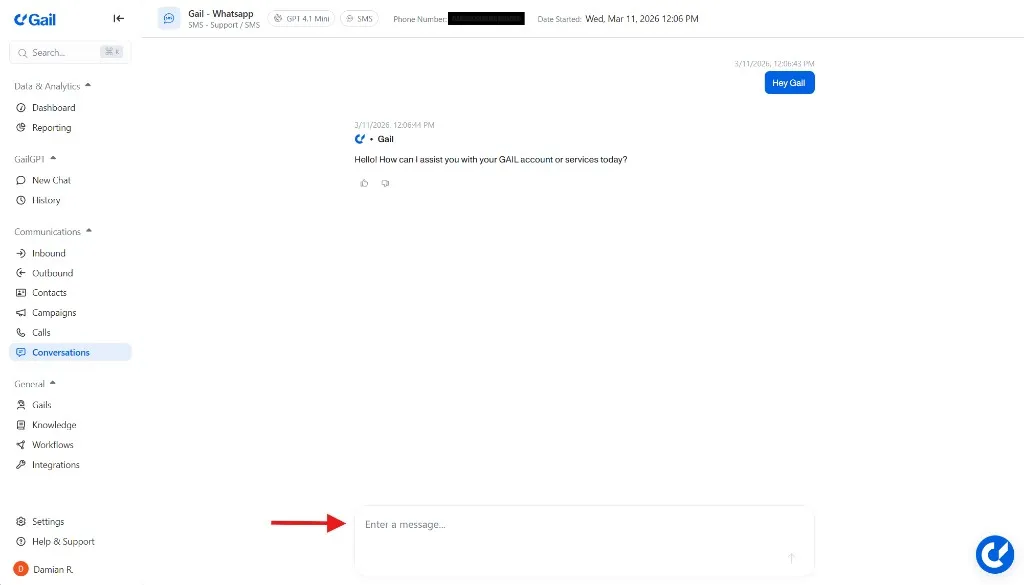
- Click on the conversation to open it
- Locate the text box
- Send a manual message to the contact
- Continue the dialogue or resolve any issues directly
Manual interventions are valuable learning opportunities. Document why you needed to step in so you can improve Gail’s automated responses for similar situations in the future.
Best Practices for Monitoring
Establish a Review Cadence
Create a regular schedule for reviewing conversations:
- Daily: Check active campaigns during the first week
- Weekly: Review performance of ongoing campaigns
- Monthly: Conduct comprehensive analysis of all conversations
- After Campaign Completion: Full review of campaign performance
Compliance and Quality Assurance
Compliance Monitoring
Use conversation reviews to ensure regulatory compliance:
- Verify opt-in consent is properly documented
- Check that opt-out requests are honored immediately
- Ensure messages include required identification and disclosures
- Confirm appropriate messaging hours are being followed
- Validate that messaging frequency aligns with regulations
SMS messaging is heavily regulated under TCPA and carrier guidelines. Regular conversation reviews help ensure your campaigns remain compliant and avoid potential fines or SMS approval revocation.
Quality Assurance Checklist
When reviewing conversations, verify:
- Messages are clear and professional
- Variables are populating correctly
- Links are working and mobile-friendly
- Response logic is appropriate
- Tone matches brand guidelines
- Grammar and spelling are correct
- Call-to-action is clear and compelling
- Opt-out instructions are present
- Contact data is accurate
Troubleshooting Common Issues
Contacts Not Responding
If you notice low response rates:
- Review message clarity and value proposition
- Test different messaging times
- Shorten message length
- Strengthen the call-to-action
- Ensure messages are personalized appropriately
- Verify contact list quality
Confused or Negative Responses
If contacts seem confused or frustrated:
- Simplify message language
- Add more context in initial messages
- Improve Gail’s response logic for common questions
- Consider adding more FAQ content to Gail’s knowledge base
Technical Delivery Issues
If messages aren’t being delivered:
- Check phone number formatting
- Ensure SMS approval status is active
Next Steps
Now that you understand how to review SMS conversations, explore these related topics:
- SMS Campaigns - Set up automated SMS campaign workflows
- SMS & Text Messaging - Create and manage text templates
- Creating Campaigns - Build comprehensive outbound campaigns
- Sequences - Create multi-step outreach flows
Tip: Reviewing SMS conversations regularly helps ensure message quality, track customer engagement, and refine your scripts for better results. Make conversation review a core part of your campaign management process.