Security Settings

View as Markdown

Security Settings

Protect your Gail workspace with comprehensive security controls.

Authentication

Password Requirements

Configure password policy for your workspace:

1password_policy:
2 min_length: 12
3 require_uppercase: true
4 require_lowercase: true
5 require_numbers: true
6 require_special: true
7 prevent_reuse: 5 # Last 5 passwords
8 max_age_days: 90

To update:

  1. Go to SettingsSecurityPassword Policy
  2. Configure requirements
  3. Save changes

Multi-Factor Authentication (MFA)

Add an extra layer of security:

Supported Methods:

  • Authenticator app (Google, Authy, etc.)
  • SMS (less secure, not recommended)
  • Hardware keys (YubiKey, etc.)

Enabling MFA:

  1. Go to SettingsSecurityMFA
  2. Click Enable MFA
  3. Scan QR code with authenticator app
  4. Enter verification code
  5. Save backup codes securely

Requiring MFA for Team:

  1. Go to SettingsSecurityMFA
  2. Enable Require MFA for all team members
  3. Set grace period for setup
  4. Save

Single Sign-On (SSO)

SSO is available on Enterprise plans.

Integrate with your identity provider:

  • Okta
  • Azure AD
  • Google Workspace
  • OneLogin
  • Custom SAML 2.0

Session Management

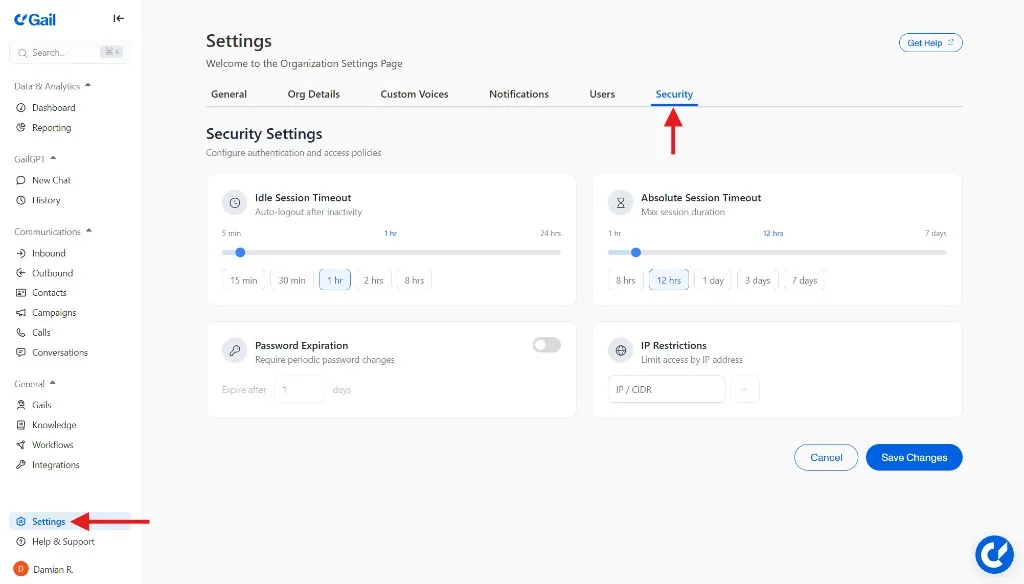
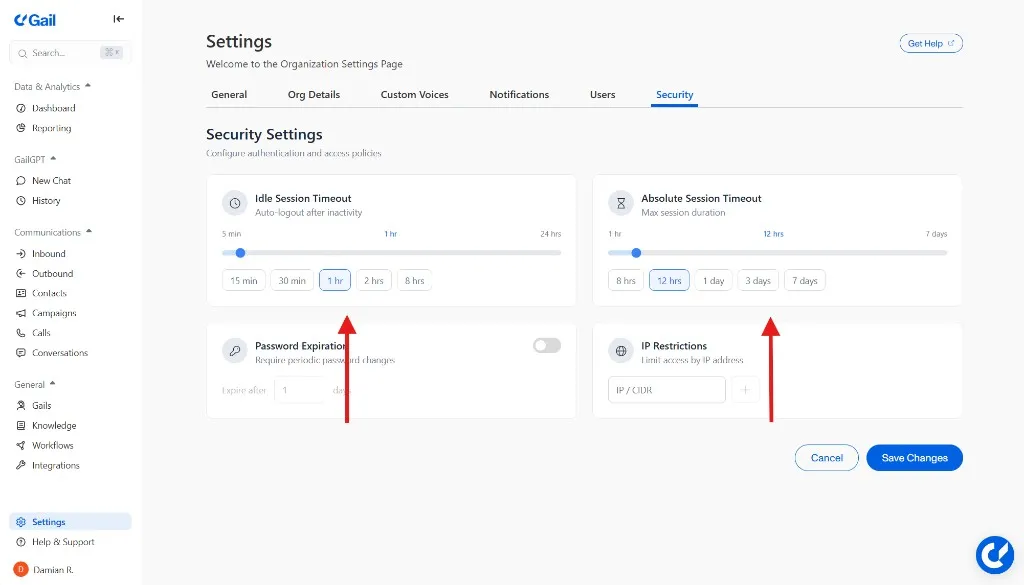
Session Timeout

Configure automatic logout:

1session:
2 idle_timeout: 30m # Logout after 30 min inactive
3 max_duration: 12h # Force logout after 12 hours

Active Sessions

View and manage active sessions:

  1. Go to SettingsSecuritySessions
  2. See all active sessions (device, location, time)
  3. Click Revoke to end a session

Force Logout

End all sessions for your account:

  1. Click Logout All Sessions
  2. Confirm

API Security

API Keys

Manage API keys at SettingsAPI Keys:

Creating Keys:

  1. Click Create API Key
  2. Name the key (e.g., “Production Server”)
  3. Set permissions (full or restricted)
  4. Set expiration (optional)
  5. Copy the key securely

API keys are shown only once. Store them securely.

Rotating Keys:

  1. Create a new key
  2. Update your applications
  3. Delete the old key

Key Permissions:

  • Full Access - All API operations
  • Read Only - GET requests only
  • Custom - Specific endpoints only

IP Allowlisting

Restrict API access to specific IPs:

1api_security:
2 ip_allowlist:
3 - 203.0.113.0/24
4 - 198.51.100.50

Rate Limiting

Default rate limits:

EndpointLimit
Standard APIs100/minute
Bulk operations10/minute
Webhooks1000/minute

Contact support for increased limits.

Data Security

Encryption

All data is encrypted:

  • In Transit - TLS 1.3
  • At Rest - AES-256

Data Residency

Data residency options available on Enterprise plans.

Choose where your data is stored:

  • United States
  • European Union
  • Asia Pacific

Data Retention

Configure how long data is kept:

1retention:
2 call_recordings: 90d
3 transcripts: 1y
4 analytics: 2y
5 audit_logs: 7y

Data Export

Export all your data:

  1. Go to SettingsSecurityData Export
  2. Click Request Export
  3. Receive download link via email

Data Deletion

Request permanent deletion:

  1. Go to SettingsSecurityData Deletion
  2. Select data types to delete
  3. Confirm deletion request
  4. Data is permanently removed within 30 days

Audit Logging

What’s Logged

All significant actions are logged:

  • Authentication events (login, logout, failed attempts)
  • Configuration changes
  • Data access (call recordings, exports)
  • Team management (invites, role changes)
  • API usage

Viewing Audit Logs

  1. Go to SettingsSecurityAudit Log
  2. Filter by date, user, or action type
  3. Export logs for analysis

Log Retention

PlanRetention
Starter30 days
Professional1 year
Enterprise7 years (configurable)

Compliance

SOC 2 Type II

Gail maintains SOC 2 Type II certification. Request our report at security@meetgail.com.

HIPAA

HIPAA compliance available on Enterprise plans with BAA.

For healthcare customers:

  1. Contact sales for HIPAA-compliant plan
  2. Sign Business Associate Agreement (BAA)
  3. Enable HIPAA controls

GDPR

For EU data subjects:

  • Data processing agreement available
  • Right to access/delete honored
  • Data portability supported

PCI DSS

Gail does not store payment card data. Call recordings containing card numbers should be redacted.

Security Notifications

Email Alerts

Receive alerts for:

  • New device login
  • Password changes
  • Failed login attempts
  • API key creation
  • Team member changes

Configure Notifications

  1. Go to SettingsNotifications
  2. Select security events
  3. Choose notification method
  4. Save

Security Best Practices

For Administrators

  • Enable MFA for all team members
  • Use SSO when available
  • Review audit logs regularly
  • Rotate API keys periodically
  • Use IP allowlisting for APIs

For Team Members

  • Use strong, unique passwords
  • Enable MFA on your account
  • Don’t share credentials
  • Log out of shared computers
  • Report suspicious activity

Incident Response

Reporting Security Issues

If you discover a security vulnerability:

  • Email: security@meetgail.com
  • Do not disclose publicly until resolved
  • We’ll acknowledge within 24 hours

In Case of Breach

If you suspect unauthorized access:

  1. Change your password immediately
  2. Revoke all API keys
  3. Review audit logs
  4. Contact support@meetgail.com
  5. Enable additional security controls

Next Steps