
Starting a Conversation with GailGPT
GailGPT is your AI assistant trained on your business knowledge. You can chat with GailGPT to get quick answers, find information, and help your team work more efficiently.
How to Start a New Chat
Starting a conversation with GailGPT is simple:
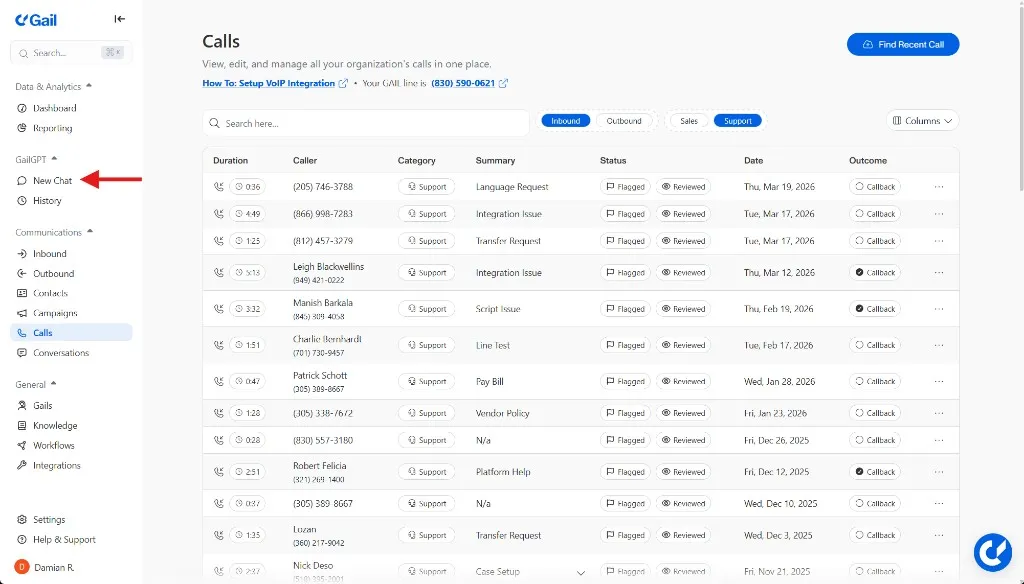
- Navigate to GailGPT - Click on “New Chat” in the left sidebar of your dashboard
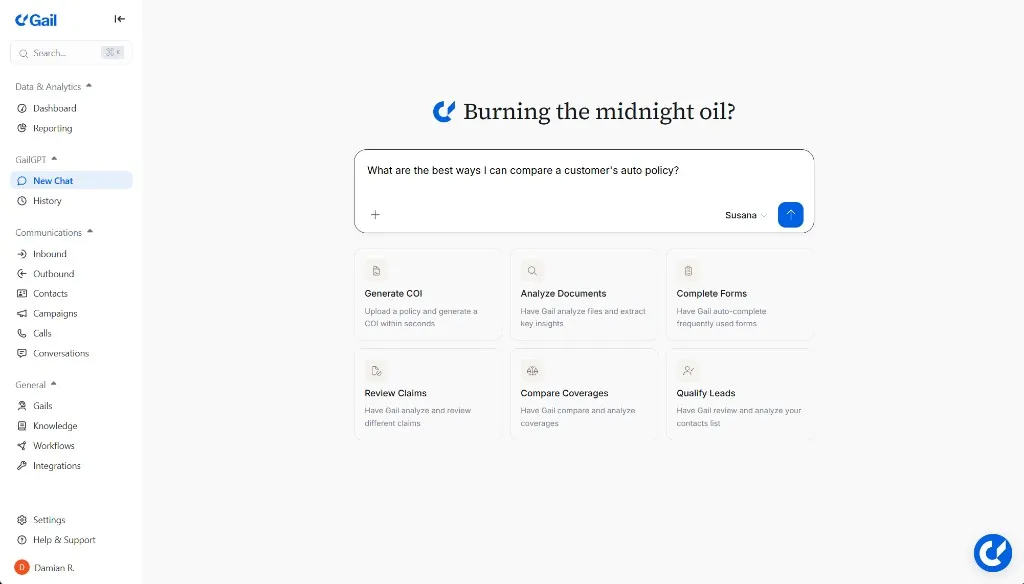
- Type your question or request - Use the chat input in the middle of the screen
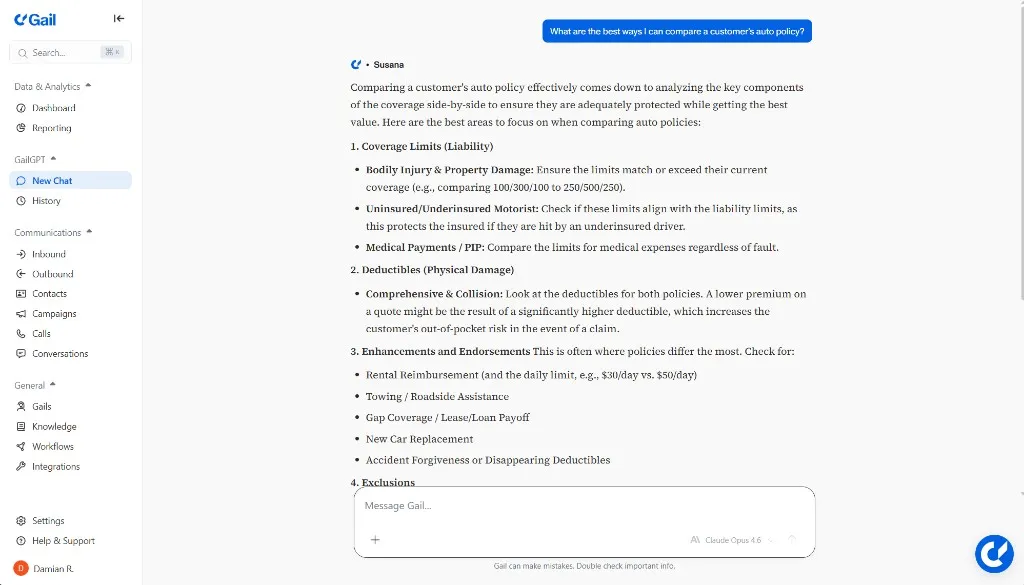
- Get instant answers - GailGPT responds in real-time based on your knowledge base
What You Can Ask
GailGPT can help you with a wide range of questions about your business:
Example Conversations
Here are some examples of questions you might ask GailGPT:
Insurance Agency Questions
You: “What are our office hours?”
GailGPT: “Our office hours are Monday through Friday, 9:00 AM to 5:00 PM EST. We’re closed on major holidays. However, your Gail Agent can handle customer calls 24/7, even when the office is closed.”
You: “How do I file a claim for a client?”
GailGPT: “To file a claim, follow these steps: 1) Log into the carrier portal, 2) Select ‘New Claim’, 3) Enter the policy number and date of loss, 4) Upload any supporting documentation, 5) Submit and note the claim number for follow-up.”
Product & Service Questions
You: “What types of insurance do we offer?”
GailGPT: “We offer comprehensive insurance products including: Auto Insurance, Homeowners Insurance, Life Insurance, Commercial Insurance, and Umbrella Policies. Each product can be customized to meet specific client needs.”
You: “What’s our cancellation policy?”
GailGPT: “Clients can cancel their policy at any time by contacting our office. We require 30 days written notice for cancellation. Depending on the policy terms, clients may be eligible for a prorated refund of unused premium.”
Workflow & Integration Questions
You: “How do I connect GailGPT to our calendar?”
GailGPT: “To connect your calendar, go to Settings > Integrations > Calendar and choose either Google Calendar or Calendly. Follow the authentication steps to grant access. Once connected, Gail can check availability and schedule appointments directly.”
Tips for Better Conversations
Be specific: Instead of “Tell me about insurance,” try “What types of auto insurance policies do we offer for new drivers?”
Ask follow-up questions: GailGPT maintains context throughout the conversation, so you can ask clarifying questions naturally.
Use natural language: You don’t need special commands or keywords—just ask questions as you would to a colleague.
Multiple Conversations
You can have multiple chat conversations with GailGPT simultaneously:
- Organize by topic - Keep separate chats for different topics or projects
- Use Separate Files - You can have Gail analyze different files per chat to keep customer data separate
What if GailGPT Doesn’t Know the Answer?
If GailGPT can’t answer your question, it might mean:
- The information isn’t in your knowledge base - Add documents to train GailGPT using your knowledge base
- The question needs clarification - Try rephrasing or being more specific
- It’s outside GailGPT’s scope - Some tasks require human judgment or access to external systems
- Your agent isn’t connected to the internet - Connecting your agent to the internet makes it much more powerful
Pro Tip: When GailGPT doesn’t know something, it’s a great opportunity to add that information to your knowledge base so it can answer similar questions in the future.
Managing Your Chat Experience
Editing Your Knowledge
If GailGPT provides incorrect information, you can:
- Update your knowledge base documents
- Remove outdated information
- Add clarifications to improve future responses
Privacy & Security
All conversations with GailGPT are:
- Encrypted - Data is encrypted in transit and at rest
- Private - Conversations are only visible to your team
- Compliant - Meets industry security and compliance standards