
Web Extract
The Web Extract node reads a web page and returns the exact fields you ask for. You describe what you want in plain language, optionally point it at a starting page, and it navigates the site, fills in search forms, clicks through to the right page, and hands back the values it found. It is built for pages that hold the data you need but offer no API to get at it.
When to use it
- You need details from a public records site, such as a company’s filing status or registered agent from a Secretary of State page.
- You want to read facts off a page that hides them behind a search box, where a plain link is not enough.
- You are pulling the same fields from many similar pages, like listing details across a set of property or product URLs.
Inputs
You must provide at least a prompt or a schema; providing both together works best. When you give starting pages, the extractor stays within those sites and does not wander off to unrelated ones.
Outputs
The names and types of the returned fields follow whatever you described in the prompt or schema.
Example
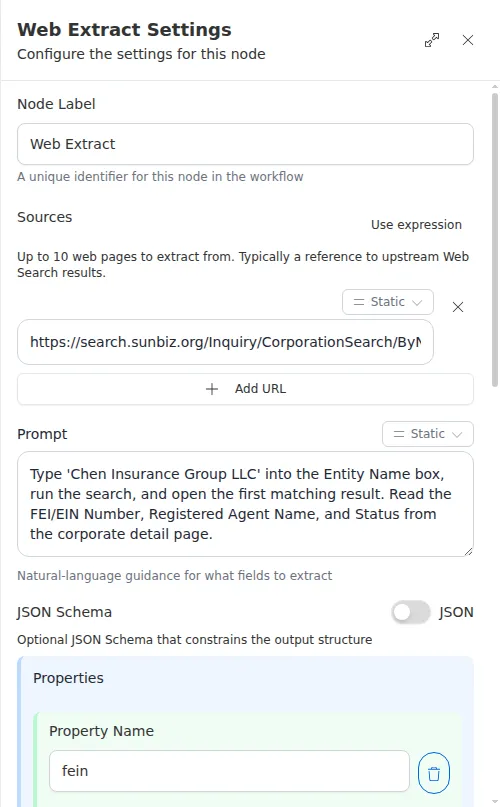
An agency needs to verify that Chen Insurance Group LLC is a real, active business before quoting it. A Web Extract node starts on the state’s corporation search page, and its prompt tells the extractor to type the company name into the search box, open the first matching result, and read the filing status, registered agent, and federal tax ID off the detail page. A schema lists those three fields so the result comes back in a predictable shape, ready for a Check step to confirm the status is active.
Extracting from a live site takes a little time, and empty results are a real outcome: the page may load fine yet not contain what you asked for. Check that the fields you need actually came back before a later step relies on them, rather than assuming they are always present.