
AgencyZoom Create Lead
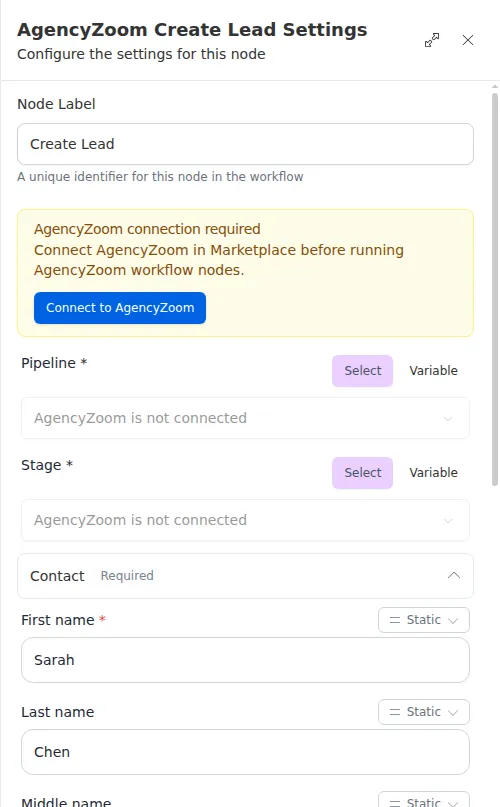
The Create Lead node adds a new personal-lines lead to AgencyZoom. Only a first name, a pipeline, and a stage are required; everything else is optional. You can set contact details, an address, key dates, a lead source, and who the lead is assigned to. For a commercial lead, use Create Business Lead instead.
When to use it
- A web form, landing page, or ad brings in a new prospect and you want them in AgencyZoom right away.
- You want every new lead to land in the right pipeline and stage without anyone typing it in by hand.
- You want a new lead assigned to a producer, a CSR, or an assignment group as soon as it is created.
Inputs
The fields are grouped in the node’s settings. Required fields are marked.
Pipeline, Stage, Lead source, Assign to, CSR, Assignment group, the other producer and CSR rows, and Custom fields are dropdowns filled from your own AgencyZoom account, so you pick by name rather than looking up ids. Once you choose a pipeline, the Stage list narrows to that pipeline’s stages.
Any field can also be an expression that reads from an earlier step, such as the email a form submitted. On a dropdown field, switch from Select to Variable to write one. An expression for an id field, such as Pipeline or Assign to, must produce the AgencyZoom id number.
Outputs
On success the node returns a confirmation that the lead was created, including the new lead’s id. Use that id in later steps, for example to add a note with Add Lead Note or to link a task with Create Task.
Example
Chen Insurance Group runs a quote form on its website. When Sarah Chen submits it, a workflow uses Create Lead with her first name, last name, email, and phone from the form. It picks the “Personal Lines” pipeline and the “New Lead” stage, sets the lead source to “Website”, and assigns the lead to Marcus Johnson. The lead appears in Marcus’s AgencyZoom pipeline within seconds of the form being submitted.
Assign to, CSR, and Assignment group are three separate ways to assign a lead. You can use any of them, or none; a lead with none is created unassigned. Leave a dropdown empty when you do not need it.
Dates and birthdays are plain text and AgencyZoom checks their format. If a value is rejected, the node hands back a failure rather than stopping the run, so follow it with a Check or Conditional to handle a lead that was not created.