
AgencyZoom Create Business Lead
The Create Business Lead node adds a new commercial lead to AgencyZoom. It takes the same contact, address, date, and assignment fields as Create Lead, plus the details that describe a business: its name, DBA, FEIN, size, and revenue. A pipeline and a stage are required, along with either a business name or a first name.
When to use it
- A business owner asks for a commercial quote and you want the lead in AgencyZoom right away.
- You want commercial prospects to land in their own pipeline and stage.
- You already collect business details, such as employee count or payroll, and want them on the lead from the start.
Inputs
The fields are grouped in the node’s settings. Required fields are marked.
Pipeline, Stage, Lead source, Assign to, CSR, Assignment group, the other producer and CSR rows, and Custom fields are dropdowns filled from your own AgencyZoom account, so you pick by name rather than looking up ids. Once you choose a pipeline, the Stage list narrows to that pipeline’s stages.
Any field can also be an expression that reads from an earlier step. On a dropdown field, switch from Select to Variable to write one. An expression for an id field, such as Pipeline or Assign to, must produce the AgencyZoom id number.
Outputs
On success the node returns a confirmation that the lead was created, including the new lead’s id. Use that id in later steps, for example to add a note with Add Lead Note.
Example
Sarah Chen fills out Chen Insurance Group’s commercial quote form for her bakery. A workflow uses Create Business Lead with the business name “Chen Family Bakery”, Sarah as the contact, her email and phone, 14 employees, and an annual revenue of 850,000. It picks the “Commercial Lines” pipeline and the “New Lead” stage and assigns the lead to the agency’s commercial producer, who sees it in AgencyZoom right away.
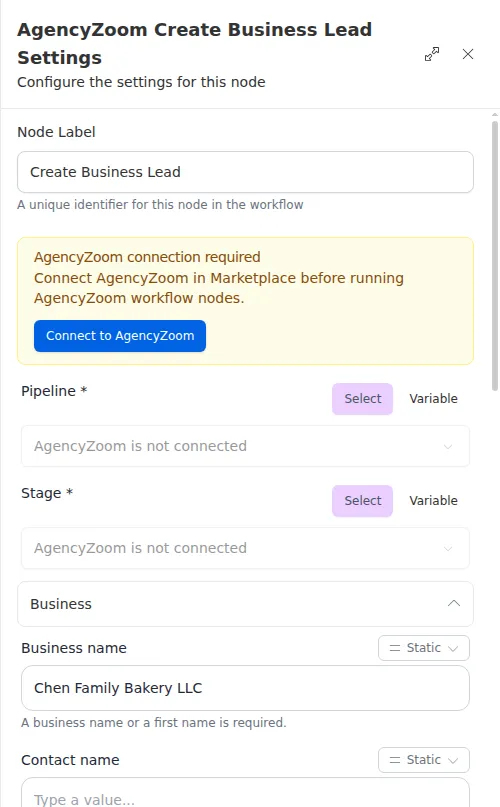
Commercial leads are often known by the business rather than a person. A business name alone is enough; you do not need a first name as well.
If AgencyZoom rejects the lead, the node hands back a failure rather than stopping the run, so follow it with a Check or Conditional to handle a lead that was not created.