
Fill PDF Form
The Fill PDF Form node takes a fillable PDF template and the data a workflow has collected, and fills the form in for you. It works out which piece of your data belongs in each field, even when the form’s field names are cryptic, writes the values in, and hands back the finished PDF. It was built for insurance forms like ACORD certificates and applications, where filling by hand is slow and error prone.
When to use it
- You need to produce a certificate of insurance or an application from data the workflow already has.
- A form’s field names do not match how your data is labeled, and you want the matching handled for you.
- You want to deliver a finished, ready-to-send document at the end of a run.
Inputs
The template and source data usually come from earlier steps written as expressions.
Outputs
Example
A certificate request comes in for Chen Insurance Group. An earlier
Document Analysis step pulls the
insured name, policy number, and coverage limits out of the uploaded policy. A
Fill PDF Form node then fills an ACORD-25 certificate template with that data,
saves it as certificate-of-insurance.pdf, and a
Send Email step delivers it
to the certificate holder, all without anyone opening the form.
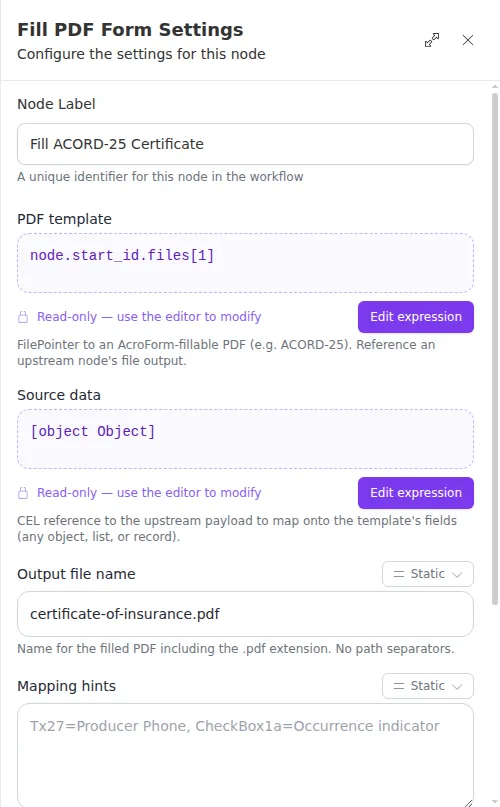
Some older PDF forms use a format that cannot be filled automatically. When that happens, the node reports the problem and suggests re-saving the file from a current PDF editor, which usually converts it to a fillable form. Give the node clearly named source data, and add mapping hints for any fields whose names are hard to guess, for the most reliable results.