
Add Contacts to Campaign (Bulk)
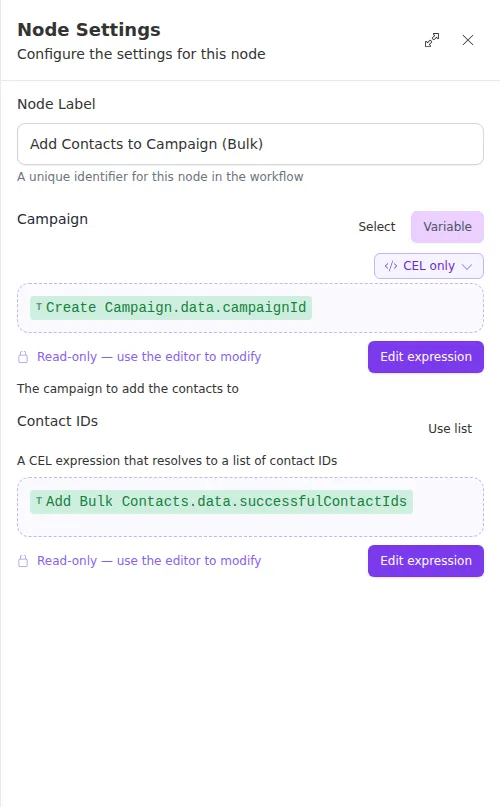
The Add Contacts to Campaign (Bulk) node enrolls many contacts into a campaign at once. Give it a campaign and a list of contact IDs, and it enrolls them all together. It is the natural next step after a bulk import that produced a list of new contacts.
When to use it
- You just created a batch of contacts and want them all enrolled in the same campaign.
- An earlier step produced a list of contact IDs, for example from an import or a payload.
- You want one step to enroll a whole segment rather than looping over people one at a time.
For a single contact, use Add Contact to Campaign instead.
Inputs
The Contacts field is commonly a single expression that points at the successful contact IDs from an Add Bulk Contacts step, so the two nodes chain together cleanly.
Outputs
A few rejected contacts do not fail the node. It still enrolls the rest and lists the rejections under Failures, so you can react to them without blocking the whole batch.
Example
Chen Insurance Group imports 400 renewal prospects with Add Bulk Contacts, which returns the IDs of everyone created. The workflow feeds those IDs straight into Add Contacts to Campaign (Bulk) to enroll them all in the spring renewal campaign in one step.
A few contacts failing to enroll does not fail the node, so check the Failures list if you need to know who was left out. Use a Check step to branch when the list is not empty.