
Triggers & Webhooks
A trigger is anything that starts a workflow. One of the most useful triggers is a webhook: a private URL for your workflow that another system can call to start a run. When your website form, your CRM, or a partner’s system needs to kick off a workflow, it sends a request to that URL and the run begins.
Some sources cannot call a URL the ordinary way, or need a safer handshake than a bare URL, so Workflows has dedicated triggers for them, all set up on the Start node:
- Gail Webhooks - a call that Gail completes, or that fails, starts a run.
- JotForm - a submission to your JotForm starts a run.
- Google Forms - a short script in your form sends each response to the workflow.
- Facebook Lead Ads - a lead from one of your Facebook lead forms starts a run.
How a webhook works
Each published workflow has its own webhook URL. When another system sends a request to it, whatever information that request carries becomes the starting information for the run, exactly as if you had started it yourself. The run then proceeds through its steps on its own.
A typical use: Chen Insurance Group has a “New quote request” form on their website. When Sarah Chen submits it, the website calls the workflow’s webhook with her details, and the workflow starts scoring the request and routing it to an agent, with no one having to press a button.
What the caller gets back
A webhook responds right away to confirm the run was accepted, and it returns a run identifier. It does not wait for the workflow to finish. If the caller needs the final result in the same request, there is a separate way to start a workflow that waits for it to complete. Otherwise, use the run identifier to follow along later. See Testing & Debugging for how run history works.
Validation and files
A webhook respects everything you set up on the Start node:
- If the workflow defines required fields, the incoming information is checked against them, and a request that is missing a required field is turned away with a clear message. See Starting a Workflow.
- If the workflow accepts file uploads, a caller can attach files too.
How private a webhook URL is
The URL is the credential. Anyone who has it can start your workflow, so treat it the way you would treat a password: give it only to the system that needs it, and keep it out of anywhere public. Nothing else about your account is exposed by it. A caller can only start the one workflow the URL names, it cannot read your data or reach your other workflows, and a request for a workflow that does not exist, or one whose webhook is switched off, gets the same plain “not found” answer, so the URL never reveals whether a workflow is there. Callers are also rate limited, so a URL that does get out cannot be used to flood you.
Requiring a shared secret
You can ask the caller to send a second value along with the request: a shared secret. It goes either in the URL as a query parameter or in a request header, and a request that does not carry the right value is turned away with the same “not found” answer as an unknown workflow.
Put it in a header when the calling system lets you set one. A value in a header stays out of URLs, browser history, and the access logs of the servers that sit in front of Gail. A value in the URL does not.
A shared secret is not a login. You hand it to the sender in plain text, so it is no more private than the URL itself. What it gives you is the ability to change it. A workflow’s URL is fixed for the life of the workflow, but you can edit the secret and publish, and from the next request on, only the new value works. The old one stops working immediately. That makes it the tool for cutting off a sender you no longer want calling you, or for recovering after a URL has been shared somewhere it should not have been.
If a caller needs to genuinely prove who it is, do not use a webhook. There is a separate way to start a workflow that requires real credentials for your organization, which is the right choice when the calling system is one your own developers control. See Starting a Workflow.
A shared secret is a different thing from a Secret. A Secret is an encrypted value you store once and refer to by name inside a workflow’s steps. A shared secret is part of the Start node’s webhook settings, and it is deliberately readable by anyone who can open the workflow, because you have to be able to read it to give it to the caller.
Only published workflows can be triggered by a webhook. While you are still building, use Testing & Debugging to start runs by hand.
Gail Webhooks
Your workflow can start on its own when something happens to a call in Gail. On the Start node, turn on Webhook, then tick the events you want under Gail Webhooks:
- Call Completed - a Gail call has finished.
- Call Failed - a Gail call failed.
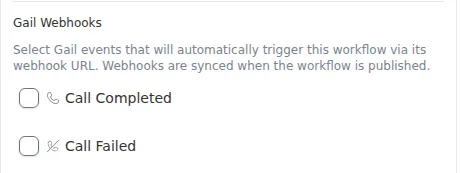
The events are hooked up when you publish the workflow, so publish again after you change them. Each event then starts one run, with the call’s details as the run’s input. The details include the call’s summary and notes but not the full transcript; use Get Call Data when a step needs the conversation itself.
The Call Completed templates are built for this trigger.
JotForm submissions
A JotForm submission can start a published workflow. JotForm can only send a submission to a URL, with no way to add a password, so Gail recognizes your submissions by a secret your form carries in a hidden field instead.
Connecting an existing form (quote intake)
The quickest path is the guided setup. Create a new workflow, choose JotForm quote intake, and press Start setup. Gail chats through the setup with you: which saved secret holds your JotForm API key, which of your forms to use (or have Gail build a new one), what each question on the form answers, and which campaign and script to call with. Press Build it and Gail creates the workflow.
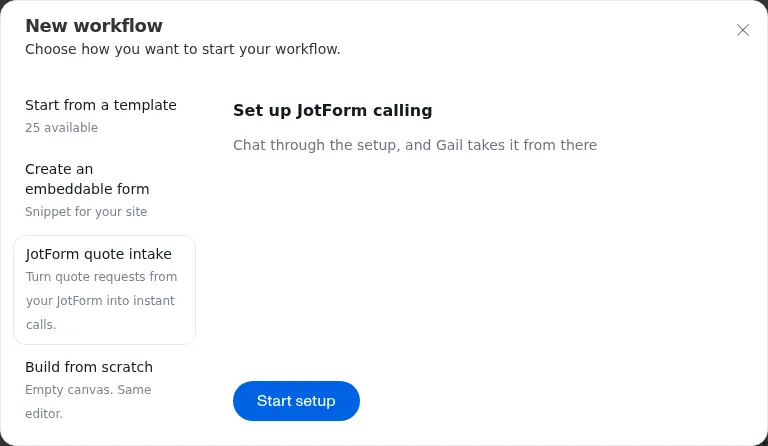
Before anything on your form changes, Gail shows every change it will make and waits for you to press Connect my form:
- A hidden question is added so Gail can tell your submissions apart from anyone else’s.
- Questions that share a name are renamed. JotForm identifies each question
by its Unique Name. When two questions end up with the same name, one answer
would be lost, so Gail renames one of them. A question named
submission_id,form_id, orform_titleis renamed too, since those names are taken by details about the submission. If the workflow reads one of those names, Gail stops instead and asks you to give the questions different Unique Names in JotForm first. - Your form starts telling Gail about new submissions, through a webhook added in JotForm.
Nothing on your form is removed or reworded, and anywhere else the form already sends submissions keeps working. If connecting stops partway, connecting again picks up where it left off without creating anything twice.
For example, Chen Insurance Group already collects quote requests on a “Personal Lines Quote Form” in JotForm. Sarah Chen runs the guided setup, picks that form, confirms that “Mobile phone” is the question Gail should call, and connects it. The next prospect who submits the form gets a call within seconds.
The API key needs full access. Gail has to read your form and add the webhook that starts the calls, and a read-only key cannot do that. Create the key in your JotForm account settings and store it as a Secret.
Setting it up by hand
Any workflow can accept JotForm submissions, not just the quote intake.
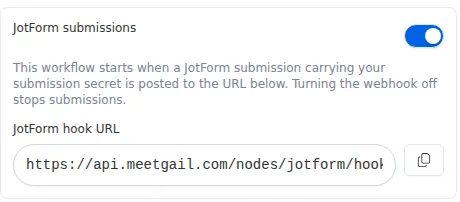
- On the Start node, turn on Webhook and JotForm submissions, then publish. The Start node shows the workflow’s JotForm hook URL.
- In the Marketplace, open the JotForm tile and generate a Submission secret. It is shown only once, so copy it straight away. If your organization already has one, reuse it on the new form - rotating it replaces the secret on every form (see below).
- In JotForm’s form builder, add a Hidden field, set its Unique Name to
x_jotform_credential, and paste the secret as its default value. - In JotForm, open Settings > Integrations > Webhooks, paste the JotForm hook URL, and save.
To stop submissions without deleting anything, turn the Start node’s webhook off. Turning it back on resumes them.
What a submission carries
Each answer arrives under its question’s Unique Name, lowercased with words
joined by underscores: a Unique Name of fullName arrives as full_name, and
mobilePhone as mobile_phone. Three details about the submission ride along
with the answers: submission_id, form_id, and form_title.
Do not use submission_id, form_id, or form_title as a Unique Name. A
question named after one of them is silently dropped. Give every question its
own Unique Name, too: if two questions share one, the first on the form wins
and the other answers are silently dropped.
One secret for your whole organization
Your organization has one JotForm submission secret, and every connected form carries it. That has three consequences:
- Rotating the secret affects every form. It takes effect immediately with no overlap, and every form using the old secret stops working until you paste the new one into its hidden field.
- Pin your forms. The JotForm tile lets you list the form IDs (up to 25) allowed to use the secret. With no forms pinned, the secret is accepted from any of your forms, and removing the last pinned form opens it back up to any form. Because the secret is visible in a form’s page source, pinning is what keeps someone who copies it from using it on a form of their own.
- A form can be connected in only one organization at a time. The hidden field holds one secret, so connecting the same form in a second organization stops it working in the first.
Google Forms
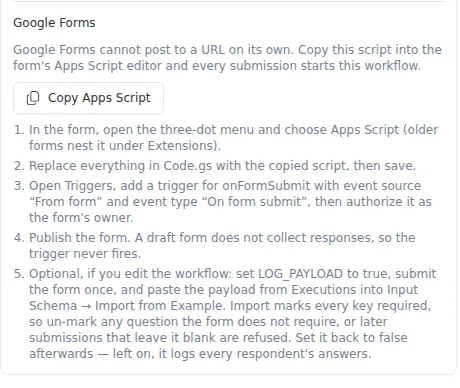
Google Forms cannot send a response to a URL on its own, so the workflow gives you a short Apps Script that does it. Every submission then starts a run.
- On the Start node, turn on Webhook, then publish the workflow.
- Press Copy Apps Script in the Start node’s Google Forms section. The copied script already contains this workflow’s URL, and its shared secret if the webhook has one.
- In the form, open the three-dot menu and choose Apps Script (older forms
nest it under Extensions). Replace everything in
Code.gswith the copied script, then save. - Open Triggers and add a trigger for
onFormSubmitwith event source From form and event type On form submit. Authorize it as the form’s owner. - Publish the form. A draft form does not collect responses, so the trigger never fires.
Google warns that it has not verified the app when you authorize the script. That is expected for a script you pasted yourself: choose Advanced, continue to the project, and allow it.
How question titles become field names
Each answered question arrives under a name made from its title: accents are dropped, spaces, hyphens, and periods become underscores, other punctuation is removed, and everything is lowercased.
Three details ride along with every response: response_id, form_id, and
submitted_at. A question the respondent left blank is absent, not empty, and a
checkbox question with several choices arrives as a list.
Name the questions to match the workflow, or write the workflow to match the questions: both work. Renaming a question later changes its field name, so the workflow stops finding that answer.
Each response is sent once. If the workflow turns it away - for example because a required field is missing - that response is not retried. Google emails the form’s owner and marks the run as failed in the script’s Executions list. A form whose two questions produce the same field name is refused the same way, on its first submission.
To see the exact field names your form produces, set LOG_PAYLOAD to true at
the top of the script, submit the form once, and copy the logged response from
Executions. You can paste it into the Start node’s Input Schema with
Import from Example. Import marks every field required, so un-mark any
question the form does not require. Set LOG_PAYLOAD back to false
afterwards; left on, it logs every respondent’s answers.
Facebook Lead Ads
A lead from one of your Facebook lead forms can start a workflow.
- In the Marketplace, open the Facebook Lead Ads tile and press Connect a Page. You choose the Page inside Facebook. An organization can connect several Pages - for example a Personal Lines Page and a Commercial Lines Page.
- On the Start node, turn on Meta lead forms and pick a Lead form from any connected Page, then publish.
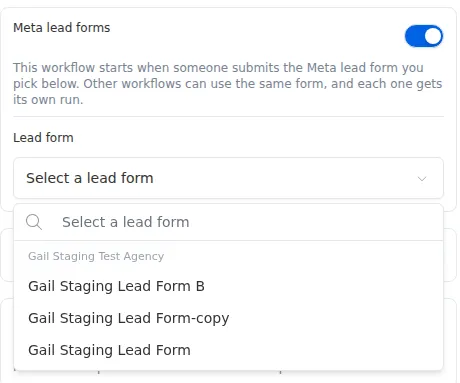
Each lead then starts one run. Several workflows can use the same lead form, and each one gets its own run of every lead.
Each answer arrives under the question’s name, lowercased with words joined by
underscores. Facebook’s standard questions arrive as-is (full_name, email,
phone_number), and a custom question such as “Budget Range” arrives as
budget_range. A question the prospect skipped is absent, not empty. Renaming a
question in Facebook changes its field name, so check a real lead’s run before
you rely on a custom question’s name.
Facebook Lead Ads is rolling out gradually. If you do not see the Facebook Lead Ads tile or the Meta lead forms option on the Start node, it is not yet available for your organization.