
Templates
A template is a saved copy of a workflow’s design that you can reuse. Once you have built a workflow you are happy with, save it as a template, and anyone in your organization can create new workflows from it in one step. Templates are how you standardize the patterns your team uses over and over, like a renewal-outreach flow or a new-client onboarding flow.
Creating a template
You can make a template two ways:
- From an existing workflow. Save any draft or published workflow as a template. It captures the workflow’s design as it is at that moment. (Archived workflows cannot be saved as templates.)
- From scratch. Build a template directly when you want a reusable starting point that is not tied to a particular workflow.
A template holds the design of the workflow, not a running copy. Changing a template later does not change the workflows already created from it.
Using a template
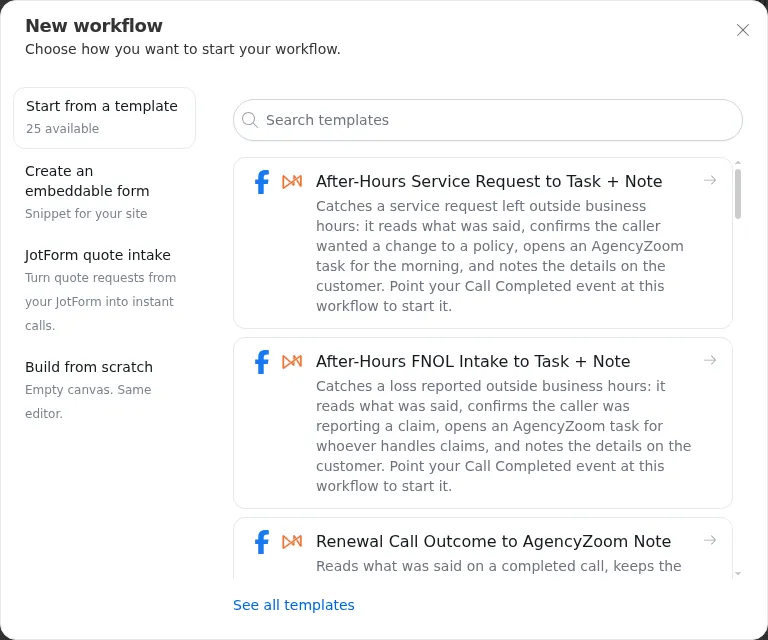
On the Workflows page, press New workflow and choose Start from a template, or press View all templates to browse the full list. Search by name or pick one from the list.
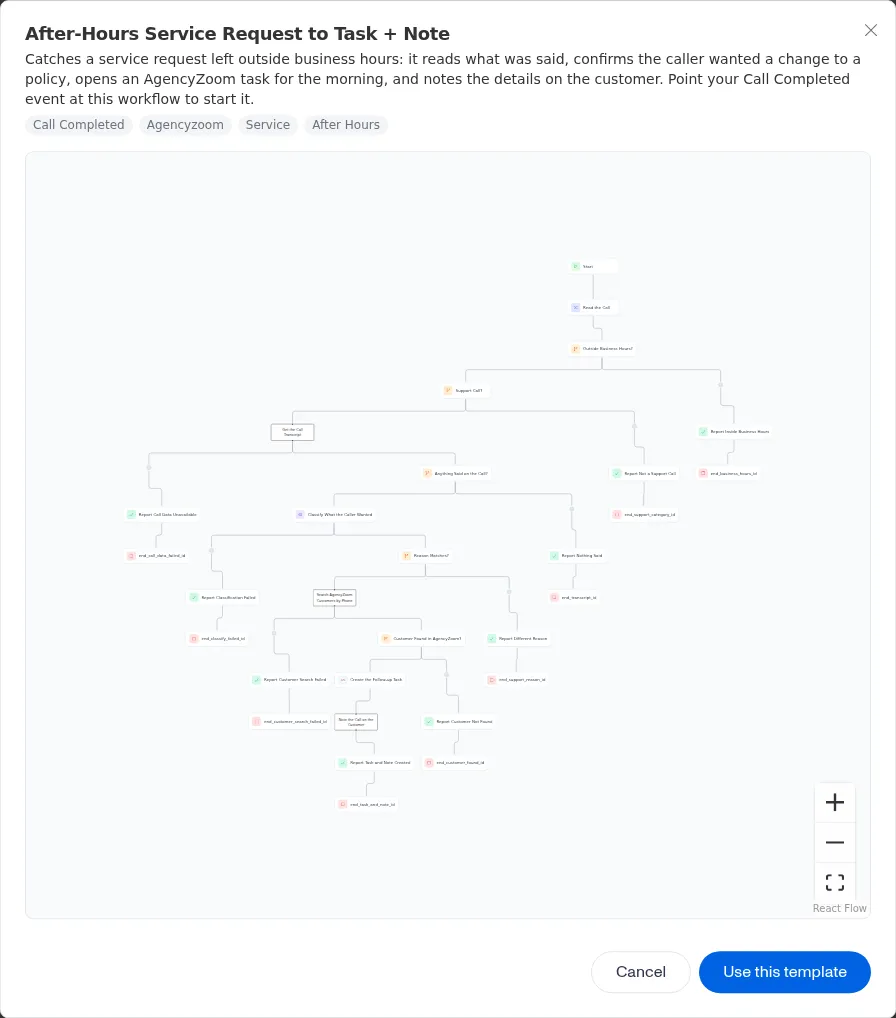
Picking a template opens a preview of its steps and tags. Press Use this template, give the new workflow a name, and press Create.
Creating a workflow from a template makes a new draft with a copy of the template’s steps and connections. From there it is an ordinary workflow: rename it, adjust the steps, and publish it when it is ready. The new workflow remembers which template it came from, so you can trace its origin.
Templates are a great way to hand off a proven pattern. Build the flow once, save it as a template, and let the rest of the team start from a known-good design instead of a blank canvas.
Settings a template asks you to fill in
Some templates point out the few settings you need to supply before the new workflow is ready, such as the email address a summary goes to or the AgencyZoom user a task is assigned to. As soon as the new workflow opens, the builder walks you through them one at a time, in the order you should fill them in, each with a short label and help text. Press Done to keep a setting and move on, Skip to leave it for later, or Skip All to go straight to the canvas. Filling them in changes only those settings on your new workflow; the template itself stays as it was.
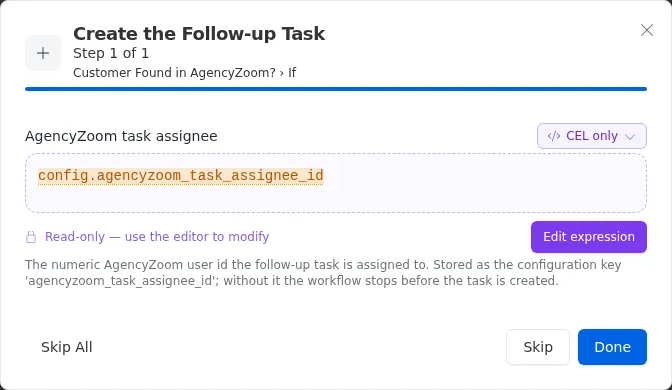
Some settings point at a value in your organization’s Configuration rather than holding the value themselves. The help text names the configuration key to set. If that key has no value, the step that needs it fails. The run then takes that step’s failure path if it has one, and otherwise stops.
A template you save from one of your own workflows starts with no settings listed. Everything in the new workflow is still editable, whether or not the template points it out.
Organizing with tags
As your library grows, tags keep it tidy. A tag is a short label you attach to a template, and you can filter your templates by tag to find what you need. Common ways to tag:
- By purpose, like
onboarding,notifications, orreporting. - By team, like
team-salesorteam-service. - By stage, like
productionordraft.
A tag is lowercase and uses letters, numbers, hyphens, and underscores (for
example renewal-outreach or high_priority). A template can have as many tags
as you like, or none.
When you filter by more than one tag, only templates that have all of the tags you chose are shown, so combining tags narrows the list.
The templates Gail provides arrive already tagged, using a small fixed set of tags you can filter on:
Because filters combine, call-completed plus after-hours shows only the
templates that act on calls outside business hours.
Tags on the templates Gail provides are kept up to date by Gail. If you change them, your changes may be replaced the next time Gail updates its templates. Tags on templates you create are yours to manage.
Templates Gail provides
Every organization starts with a library of ready-made templates for common agency work. Create a workflow from one, fill in the settings it asks for, and publish it. An organization created before a template was added may not have that template yet; contact support to get it. Each family below needs a little setup first, usually a few shared values in your Configuration and a way for the workflow to be started.
Lead response
Each template takes a new lead from one channel, adds it as a Gail contact, and enrolls it in one of your campaigns. The channels covered are website quote forms, website contact forms, website chat, mortgage, realtor, and dealer referrals, incomplete online quotes, and personal or commercial lines leads (for example Website Quote Form to Voice Quote Intake or Realtor Referral to Voice Quote Intake). Two variants also check AgencyZoom: New Lead Duplicate Check in AgencyZoom notes a repeat inquiry instead of creating a duplicate contact, and Missing Phone Number to Agent Task gives an agent an AgencyZoom task when a lead arrives without a usable phone number.
Setup: add the campaign each template enrolls into to your Configuration
(for example campaign_quote_intake), and set country_code (such as US),
which every lead template uses to read the lead’s phone number. Then point the
lead source at the workflow’s webhook. See
Triggers & Webhooks.
If the campaign is missing, the lead is still added as a contact, but it is not
enrolled.
Form and lead-ad submissions
Three lead response templates start from a form service instead of a plain webhook, and hand the lead to the same quote intake campaign:
- JotForm Submission to Voice Quote Intake starts each time someone submits a connected JotForm form.
- Google Form Submission to Voice Quote Intake starts each time someone submits a Google Form that has the Gail script added to it.
- Facebook Lead Ad to Voice Quote Intake starts each time a Facebook lead ad on one of your connected Pages collects a lead.
Setup: set campaign_quote_intake in your Configuration, then connect the
form or lead ad to the workflow as described in
Triggers & Webhooks.
After-hours quote request
After-Hours Quote Request with Canopy Connect and AgencyZoom answers a personal lines quote request that arrives after hours by texting the customer a Canopy Connect link, so they can share their current insurance details before anyone at the agency is back. It texts only for personal lines quote types (auto, homeowners, renters, and personal umbrella).
This template does not check the time itself, and it is not tagged
after-hours. It answers every quote request that reaches it, so point only
your after-hours quote traffic at it.
Setup: add agency_name and canopy_widget_url to your Configuration. Your
organization also needs text messaging set up and an AgencyZoom connection.
Call completed
These templates act on each call Gail finishes:
- Completed Call to AgencyZoom Note writes a summary of every call onto the matching AgencyZoom customer.
- Completed Service Call to AgencyZoom Note keeps only calls where a customer asked for a change to a policy they already hold, and notes the request in AgencyZoom.
- Renewal Call Outcome to AgencyZoom Note keeps only calls about a renewing policy and notes how the conversation went.
- After-Hours Caller to Email Summary emails a summary of each call that comes in outside business hours.
- After-Hours FNOL Intake to Task + Note catches a loss reported after hours, opens an AgencyZoom task for whoever handles claims, and notes the details on the customer.
- After-Hours Service Request to Task + Note does the same for a service request left after hours.
Setup: on the Start node, tick Call Completed under
Gail Webhooks,
then publish the workflow. It does nothing until you do. The email template also needs
email_after_hours_summary_recipient in your Configuration, and the two task
templates need agencyzoom_task_assignee_id (the AgencyZoom user who gets the
task). If one of those values is missing, the run stops without sending the
email or creating the task.
The after-hours templates treat business hours as weekdays from 14:00 to 22:00 UTC. That is 9 to 5 Eastern in winter and 10 to 6 Eastern during daylight saving time. Saturdays and Sundays always count as after hours. If those hours do not match your agency’s, adjust the business-hours check in your workflow after you create it.
Retiring a template
When a template is no longer needed, archive it. An archived template cannot be used to create new workflows and stops appearing in your active list, but the workflows already made from it keep working.