
Add Bulk Contacts
The Add Bulk Contacts node creates many contacts in Gail in a single step. It is built for imports: give it a list of contact records, often the rows of a parsed spreadsheet, and it adds them all at once, reporting which succeeded and which did not.
When to use it
- You are importing a batch of people from a spreadsheet or an upload.
- An earlier step produced a list of contacts and you want them all in Gail before moving on.
- You want the successful contacts’ IDs back so you can enroll them in a campaign in the same run.
For a single person, use Add Contact instead.
Inputs
The Contacts field is usually an expression pointing at the rows from a Parse CSV step, but you can also type a fixed list when the set of people is known up front.
Outputs
A few rejected rows do not stop the node. It still creates the good records and reports the rest under Failures, so a large import is not blocked by a handful of bad rows.
Example
Chen Insurance Group uploads a spreadsheet of 400 renewal prospects. A workflow parses the file into rows, hands those rows to Add Bulk Contacts with duplicate-skipping on, and gets back the list of new contact IDs. Those IDs flow straight into Add Contacts to Campaign (Bulk) to enroll everyone who was created into the spring renewal campaign.
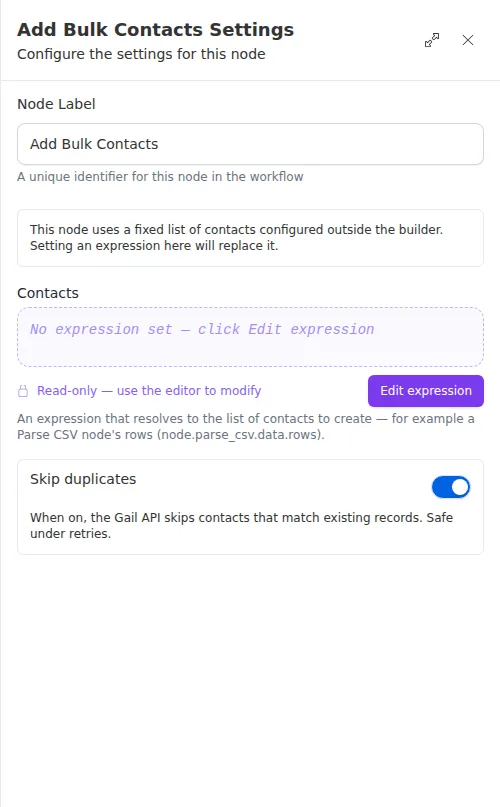
Leave duplicate-skipping on unless you have a reason not to. If a run is retried after a partial import, skipping duplicates means the retry will not create the same people twice.