
Run Skill
The Run Skill node hands an open-ended task to a Skill: a saved, reusable set of instructions and helper files kept in your organization’s catalog. When it runs, the Skill works in a private sandbox where it can write and run code to get the job done, then returns its answer along with any files it produced. Use it when a step needs real computation or file work that a single prompt cannot cover.
When to use it
- You need to crunch data mid-run, like totaling a column across an uploaded spreadsheet or reconciling two files.
- You want to produce a file, such as a summary report, a CSV, or a formatted document, and pass it to a later step.
- You have a task worth packaging once and reusing across many workflows.
Inputs
The Skill itself is picked when you build the workflow, not from data at run time. When you attach input files, the node makes them available to the Skill inside the sandbox, so write the instruction to point at the uploaded files.
Outputs
Example
An agency uploads a policy schedule as a spreadsheet at the start of a workflow. A Run Skill node points at a “policy summary” Skill and instructs it to read the uploaded file, total the premium column, and produce a one-page summary as a CSV. The Skill does the work in its sandbox and returns the CSV, which flows into an Agent step that writes a short plain recap for the account manager.
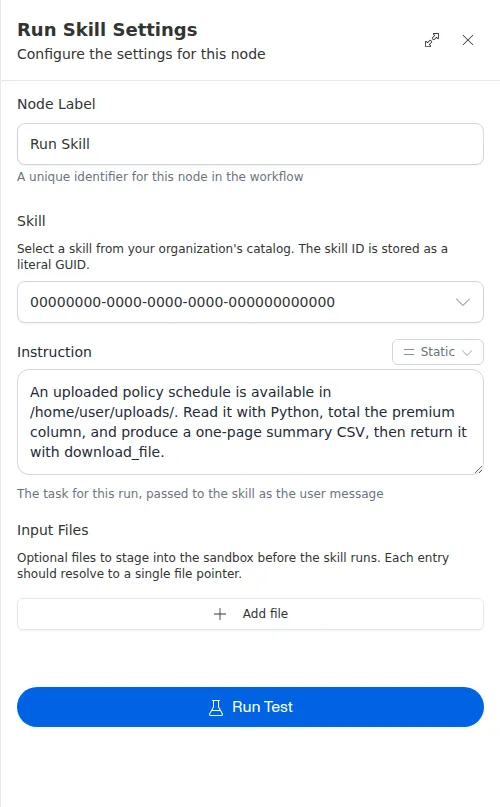
Files the Skill produces can be passed directly into any later node that accepts files, so there is no need to rebuild them from the final text. When you attach input files, tell the Skill to look for them in your instruction. Run Skill may not be available in every account; if you do not see it in the builder, it is not turned on for you.