
How Workflows Run
Every workflow follows the same simple shape: something kicks it off, a series of steps run in order, and then it finishes. Once you can picture that flow, the builder canvas makes sense at a glance.
The shape of a run
A workflow always moves in one direction, from a beginning to an end:
- Start is where a run begins. It is the single entry point of the workflow, and it can capture information to work with, such as a new lead’s name and phone number. See Starting a Workflow.
- Steps are the nodes in the middle that do the actual work: sending a message, adding a contact, making a decision, and so on. They run one after another, following the connections you draw.
- End marks where a run stops. When the workflow reaches an End step, that run is complete.
Each run flows from Start, through the connected steps, to End. If you run the same workflow ten times, you get ten separate runs, each following the same path with its own data.
What makes a run begin
A workflow does not run on its own. It starts when it is triggered. A run can begin because someone starts it by hand, because another system sends it a signal, or on a schedule you set. You can read more in Triggers & Webhooks.
How data moves between steps
Steps are not isolated. Each step can use information produced by the steps before it. The Start step might capture a phone number, and a later Send SMS step can text that exact number. This passing of data from one step to the next is what lets a workflow react to real information instead of fixed values. See Variables & Data Flow.
When a step has trouble
Steps are built to be reliable. If a step hits a temporary problem, the workflow gives it another chance or two before giving up, and some steps that should never run twice are set to run only once. You do not have to configure any of this to get started. For the details, see Timeouts & Retries.
A tour of the canvas
You build and read workflows on a visual canvas. Each step is a node, and the lines between the nodes are the connections that set the order of the run.
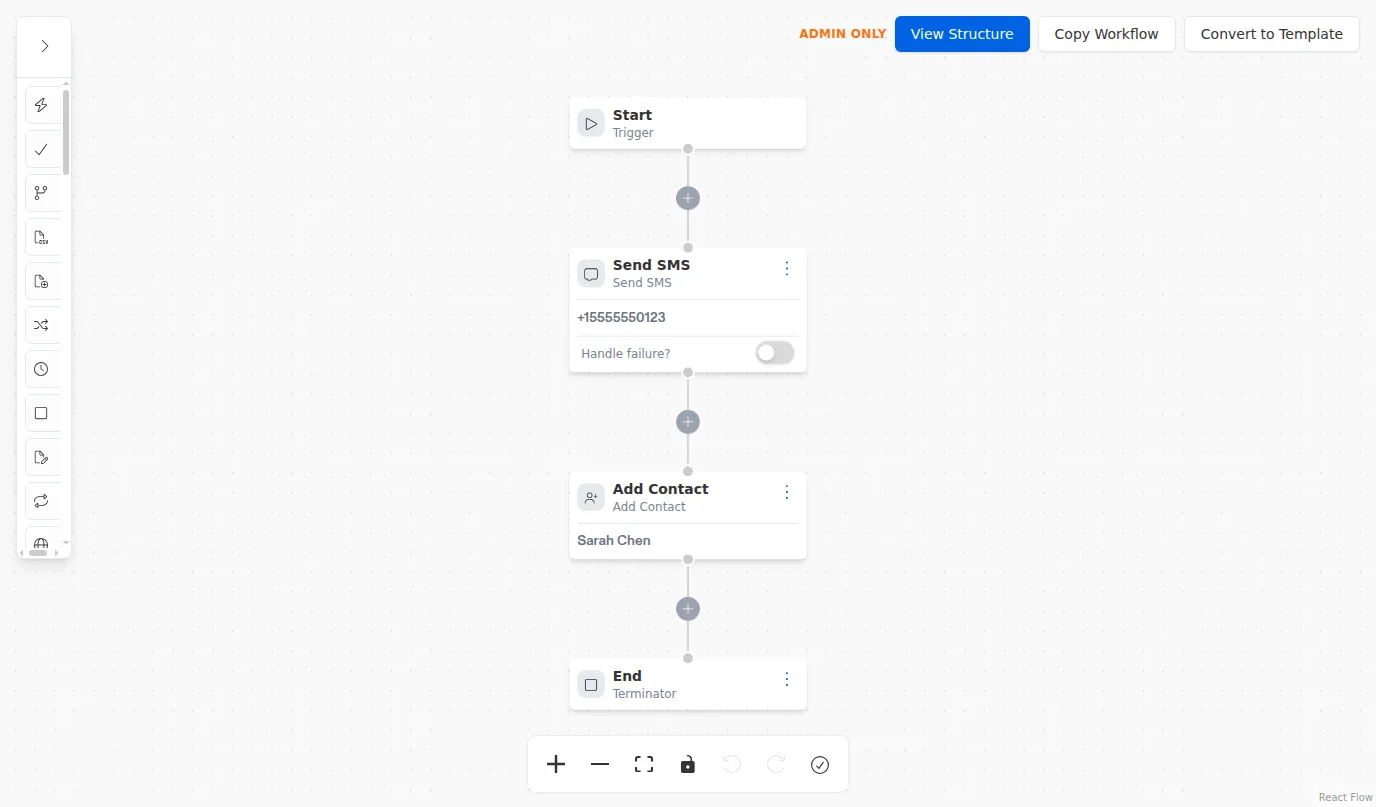
Reading the canvas above, top to bottom:
- The Start node at the top is the entry point.
- Each step below it is a node that does one job. Selecting a node opens its settings so you can configure it.
- The connections between nodes are the arrows that define the order steps run in.
- The End node at the bottom finishes the run.
If the canvas ever feels crowded, use Fit View to bring every step back into view at once.